Tag: open-source

  • Using AI to write WordPress documentation

    With the recent creation of the WordPress core-AI team, the documentation team is taking advantage of this opportunity to revamp the process for writing user documentation, or HelpHub articles – as it is known in the team.

    The challenges of writing user documentation in WordPress

    • Time-Consuming: Creating user documentation takes time, as the process is lengthy, sometimes features are updated even before its article is written.
    • Lengthy process: The process includes learning about the features (new or those being updated) > writing the article > reviewing > correcting and waiting for the last release candidate to get accurate screenshots and videos > posting the article.
    • Inconsistent Formatting: Even with a template and guidelines, formatting is still an issue. There are questions of when to use a screenshot vs. a video, or the size of the images.
    • Keeping It Up-to-Date: Features change often, but sometimes the documentation is not updated because preference is given to new features.
    • Lack of Contributors: The documentation team is not large and because the time constraint that exists during a release, the team falls behind in writing new articles or maintaining updated documentation.
    • Missing opportunities: As far as I remember, the documentation team has been focused on WordPress version releases, missing entirely the Gutenberg releases that could help in maintaining updated documentation.

    Project goals

    The main goal of this project is to teach AI to write verifiable and specific user documentation without developer jargon.

    It is important that AI, named ChatGPT or Gemini learn the WordPress language, the jargon and the style guides so every team can take advantage of it.

    In the future, we hope that this new process is also useful for translators and anyone writing documentation.

    The Proposal: Responsible AI workflow for creating new documentation for WordPress 6.9 in WordPress.org.

    This work is part of the sponsorship by Kinsta to contribute to WordPress.

  • Is my small contribution too small for WordPress’ Five for the Future?

    In the past couple of weeks there has been much talk about WordPress.org’s Five for the Future program. The discussion is long and has many ramifications and you can read this post from The WP Minute if you want to learn more.

    Among the Twitter conversations and Post Status’ Slack I read about people only being able to contribute 1 to 2 hrs per week and that does not equal to the 5% of much. Let’s get back to what Josepha Haden Chomphosy said in WP’s podcast: Five for the Future’s True Intentions.

    The 5% in Five for the Future is aspirational… not a requirement.
    Josepha Haden Chomphosy
    Tweet

    Let’s put things in perspective

    Of course it is aspirational. And those 1 to 2 hours per week are needed in the WordPress project more than you think. That amount of time will have great impact in the work we do.

    WordPress.org is not only core and it is not all about the code. There are many other things we do to maintain the project alive. So perhaps we have failed at letting new contributors know what they can do with their minimal time.

    See, we are so happy when new contributors join us that we welcome them with open arms and give them all the freedom to contribute as they wish. But the WordPress project in itself is huge and it can be a daunting rabbit hole when you have no guidance.

    I think, it is time we cut their wings a bit and start pointing some fingers, not at people but at tasks.

    Author AlexBrylov

    Make my contribution count

    I have gathered a list of tasks anyone can contribute in less than 3 hours per week to the WordPress Project. One caveat, I do not contribute to every WordPress team, so I am only mentioning the ones that I am aware of. These are smaller tasks but in any way less important.

    Documentation

    The docs team meets weekly, twice a month there is a meeting to update or discuss specific projects/collaborations. The other two weeks is issue triage for documentation. The team meets on Tuesdays at 14:00 UTC. For more information checkout this post about Onboarding to the Documentation team.

    • Review old and broken links in documentation
    • Review code in documentation
    • Add new screenshots to articles (some features change after WordPress version is updated)
    • Write an article for either end user or developers documentation
    • Take notes during meetings

    Learn

    The training team is creating lessons and tutorials for WordPress. No need to be certified trainer to help out as there also tasks that would support the team. The team meets on specific dates and times for Americas/EMEA and APAC teams. Attending a team meeting and reading the handbook are the best ways to get started.

    • Take notes during meetings.
    • Create lesson plans.
    • Review lesson plans – grammar, spelling, punctuation.
    • Help test the lessons before launching.
    • Audit the content of the lessons.
    • Are you a non-English speaker? help translate a lesson.

    Core

    Core is broken into smaller teams. There is no best place to start, I suggest find what interests you and go from there. Attending a dev chat is also a great way to familiarize yourself with how the team works.

    • Participate in bug scrubs for WP versions or components.
    • Checkout the Good First Bugs report and create or test patches and comment on Trac tickets.
    • Take notes during Dev chat. Meetings are every Wednesday at 20:00 UTC

    Test

    Test team is busy now with Full Site Editor and have been working on feature and block testing. We recently had a usability testing session that lasted about 20 minutes. The team doesn’t meet regularly but you can drop in the Slack channel with questions or feedback anytime.

    • Participate in an FSE testing call.
    • Test blocks or FSE features and report results, issues and bugs in the teams Slack channel.

    Although not all 21 make teams in WordPress.org are looking for contributors with short amount of time available, there will always be a team or two who will mostly appreciate your contribution. And as I say before, it is not an exhaustive list and I would love to add more items to the list in the future.

  • Redesigning the end-user documentation in the WordPress project – case study

    For the past 2 years I have been busy reading and reviewing the end-user documentation in WordPress.org. The goal was to create a new design for the articles as they look outdated. The hidden problem was the problematic search, which is far more important than the way a page looks. This project is written into two parts.

    The discovery phase

    While reviewing the documentation, I found discrepancies in the navigation. Discovered that several articles were included in more than one category, the article listing changed when going back in the browser and there was no clear navigation.

    The revision included the 15 requirements that the documentation team had gathered during the migration of the documentation from the Codex (the previous documentation repository for the WordPress Project.)

    The most urgent issues to solve were the navigation to improve search and the user experience and, identifying the users.

    Methodology

    I didn’t follow any specific methodology. After researching documentation sites for several software companies, open-source and privately-owned, I understood the path to follow.

    The path guided to find the four pillars to create the sitemap. When thinking of how to structure end-user documentation it is difficult to think about new, intermediate or advanced users because one cannot really identify who is whom or what level is each user. Instead, it is best to follow a “step-by-step” build; what do I need to know before building a site, what are the requirements, any technical hiccups (maintenance), etc.

    1. What is WordPress? What is its story? Is WordPress the best CMS for the user’s project?
    2. What does the user need to create and maintain a WordPress blog or site? First steps, requirements, maintenance, troubleshooting
    3. WordPress dashboard – daunting for new users, get to know your new software, how to add content, how to manage media.
    4. Customization – themes, blocks, FSE, plugins, colors, etc.

    Identifying the end-users

    Creating personas for a software that is used by millions of people is absolutely useless. As soon as one persona is created, you leave out 99% of the users. Instead, I identified users by roles.

    The non-developer users that search WordPress end-user documentation falls into any of these roles:

    • Bloggers – new or not, anyone who writes a blog and wants to customize it without the help of a developer.
    • New users looking for a CMS to build a website.
    • Content creators that are looking for content to create tutorials or references for their own products.
    • WordPress consultants that provide service to clients.
    • Support teams from companies that look for content to support their own products/services or, that provides tech support for their clients.
    • Translation teams/contributors that are translating documentation into their own languages.

    The result: a new site map for WordPress.org Helphub

    There were 170 articles written when we started the reclassification. The new WordPress features including the Block Editor, Full Site Editing and new blocks, increased the number of articles to about 250 and there are plans to write more. The reclassification needs to take into account the growing needs of WordPress.

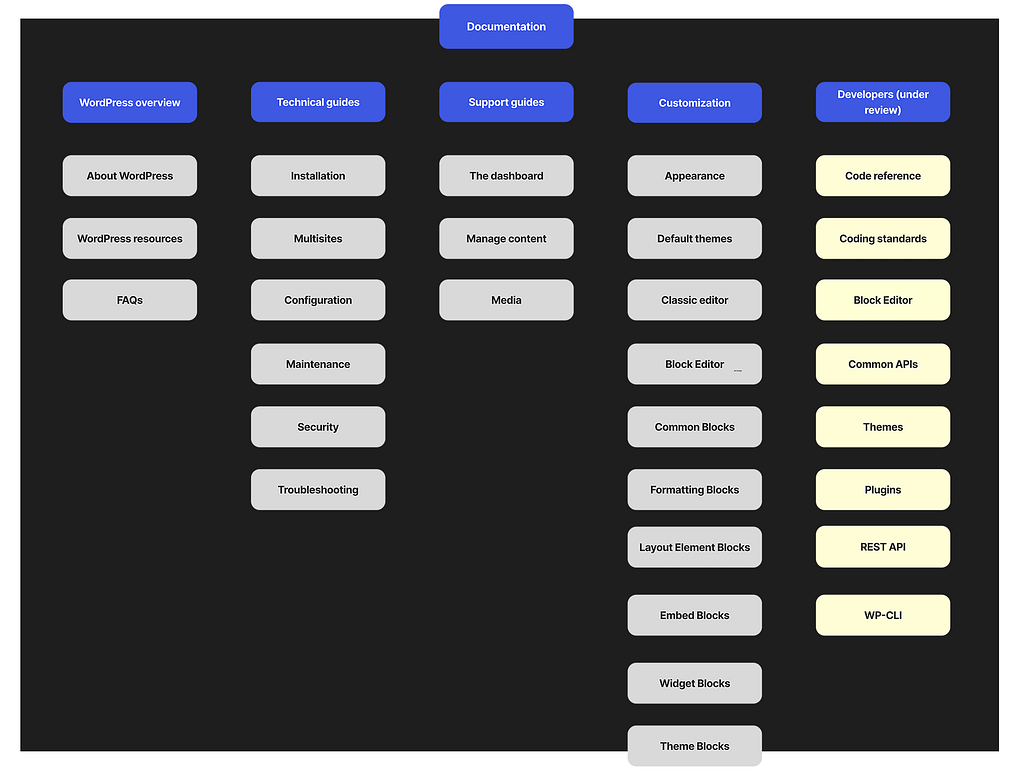
    The site map now includes 4 main categories with subcategories under each to allow growth. Below is an image of the recommended sitemap. The developers column is under review.

    Image and link to the recommended new site map for end-user documentation in the WordPress project.
    The recommended new site map for HelpHub in WordPress.org